Claude Code 쉽게 따라하기 (기본편)
- 1. Project 설정, CLAUD.md 이해하기
조대협 (http://bcho.tistory.com)
Project Setup
첫번째로 해야 하는 일은, 기존의 프로젝트가 있는 (또는 작업할) 디렉토리에서 claude code 의 /init 명령을 수행하는 것이다.
Claude code를 실행한다음 다음과 같이 “/init”명령을 실행한다
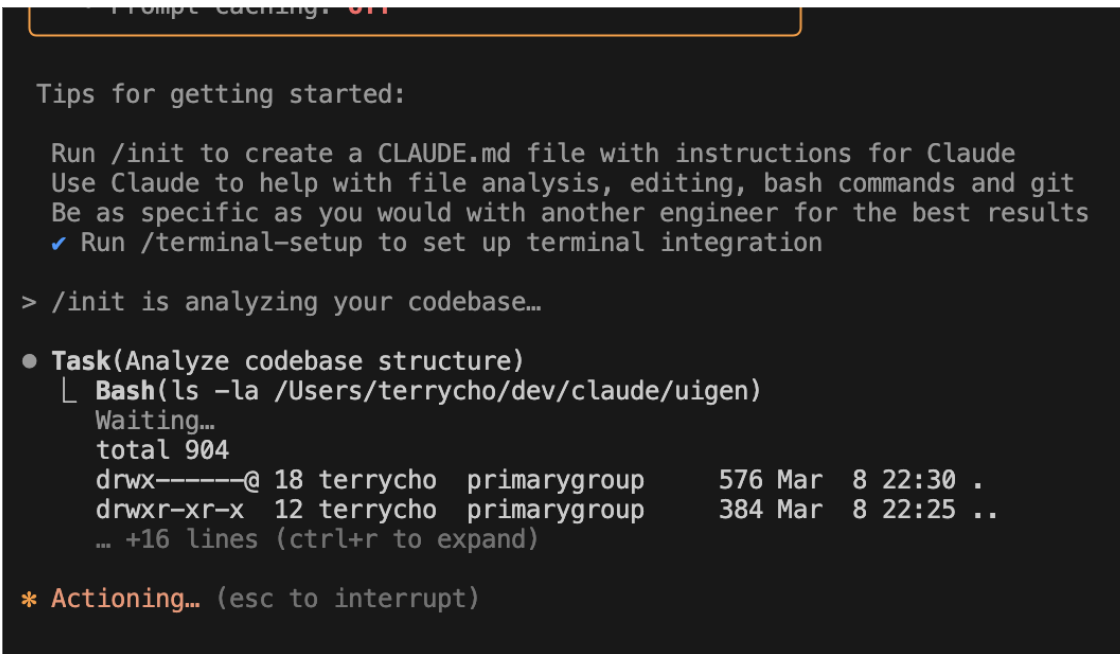
Init 작업은 현재 디렉토리의 내용을 스캔해서 내용을 요약해서 CLAUDE.md 파일을 생성한다.
CLAUDE.MD 파일이란?
CLAUDE.MD는 매우매우 중요한 파일인데, 이 파일은 *.md 파일 포맷으로 안에 들어가 있는 내용은 Claude Code가 어떻게 동작할지를 가이드 하는것이다.
예를 들어서, 아키텍처나, 코딩 스타일, 중요한 기능을 가이드 하거나 개발 과정에서 Claude Code가 사용해야 하는 Command (Bash)등을 가이드 한다. 이 외에도 여러가지 명령을 내릴 수 있는데, Claude Code를 얼마나 잘 쓰느냐는 이 CLAUDE.md 파일을 얼마나 잘 정의하느냐가 매우 중요하게 작용한다.
아래는 CLAUDE.md 파일의 일부이다.
| ## Commands ```bash # Development npm run dev # Start dev server with Turbopack (uses node-compat.cjs shim) npm run dev:daemon # Start in background, logs to logs.txt # Build & Lint npm run build npm run lint # Testing npm test # Run Vitest tests npm test -- --run path/to/test.ts # Run single test file # Database npm run setup # Install deps + generate Prisma client + migrate npm run db:reset # Reset database (destructive) npx prisma studio # Open Prisma GUI ``` Requires `ANTHROPIC_API_KEY` environment variable (and optionally `AUTH_SECRET` for JWT sessions). ## Architecture ### Core Flow 1. User types a prompt → `ChatProvider` sends to `/api/chat/route.ts` 2. API calls Claude with file management tools and system prompt 3. Claude uses `str_replace_editor` / `file_manager` tools to write files into the virtual file system 4. FileSystemContext broadcasts changes → preview iframe recompiles JSX and re-renders live ### Virtual File System (`src/lib/file-system.ts`) In-memory VirtualFileSystem class that never writes to disk. Supports CRUD, serialization for DB persistence, and hierarchical structure. The FileSystemProvider context (`src/lib/contexts/`) wraps the whole app. ### Live Preview (`src/components/preview/`) - JSX is transformed in-browser (via `src/lib/transform/`) using Sucrase/Babel - Rendered inside a sandboxed iframe with an import map for module resolution - Errors are caught and displayed inline ### AI Integration (`src/app/api/chat/route.ts`) - Uses `@ai-sdk/anthropic` (Vercel AI SDK) for streaming - Two tools: `str_replace_editor` (create/edit files) and `file_manager` (delete/rename/list) - System prompts are in `src/lib/prompts/` - Project state (serialized VFS + chat history) is saved to SQLite via Prisma after each response ### Authentication & Persistence - JWT sessions via `jose` (no NextAuth) - `middleware.ts` validates sessions and injects user info into headers - Anonymous users get a full experience; authenticated users get project save/resume - Database: SQLite with Prisma (`prisma/schema.prisma`) — `User` and `Project` models |
개발용 서버나 데이터베이스를 기동하는 데 필요한 bash 명령어와, 구현하고자하는 시스템에 대한 아키텍처등을포함하고 있다.
CLAUDE.md 파일 수정하기
만약에 CLAUDE.md 파일을 수정하고 싶으면, 파일을 직접 수정해도 되지만, claude command라인에서 “#”을 이용하면, 해당 내용이 CLAUDE.md 파일에 자동으로 추가된다.

CLAUDE.md 파일의 종류
우리가 살펴본 CLAUDE.md 파일은 ,사실 CLAUDE.md파일은 3가지 종류가 있다.
- CLAUDE.md : 앞의 예제에서 본 파일로, /init 명령어에 의해서 생성된다. CLAUDE.md 파일을 보통 git에 같이 commit되서 저장되고, 해당 리포를 공유하는 개발자들과 공유된다.
- CLADE.local.md : 들어가는 내용 자체는 같지만, 코드 리포에 커밋되지 않는다. 즉 다른 팀원들과 공유하지 않고, 나만 사용하는 가이드를 제공할때 사용한다.
- ~/.claude/CLAUDE.md : 내 컴퓨터에 있는 모든 Claude 프로젝트에 걸쳐서 사용이 된다. 마찬가지로 소스리포에 커밋되지 않는다.
추가 레퍼런스 정보 전달하기
특정 파일 참고하기
Claude code에 명령을 내릴때, 특정 파일을 참고하게 하려면 파일명에 @ 기호를 써서 파일을 참고하게 할 수 있다. 예를 들어 데이터 베이스 스키마를 prisma/schema.prisma 파일을 참고하게 하려면, 아래와 같은 명령을 이용하면 된다.
| The database schema is defined in the @prisma/schema.prisma file. Reference it anytime you need to understand the structure of data stored in the database. |
단 이 파일 첨부 명령을 현재 연결된 세션내에서만 유효하기 때문에, 일회성 정보가 아니라면, 이런 정보는 #을 넣어서 CLAUDE.md에 업데이트 되도록 하는 것이 좋다.
화면 스크린샷 전달하기
Claude Code 기능중에서 꿀팁 중에 하나가, 화면 스크린샷을 입력으로 받을 수 있다.
이 기능은 특히 UI 개발을 할때, 스크린샷을 찍어서 디버깅하거나, UI 개발시 스크린샷을 레퍼런스로 넘겨서 구현하게 하는데 매우 유용하게 사용할 수 있다. 스크린샷을 파일로 저장해서 넘길 수 도 있지만, Claude Code는 클립 보드에 있는 스크린샷을 그대로 입력받을 수 있다. 화면 스크린샷을 클립보드에 저장한후,Claude prompt 상에서 Ctrl+V로 스크린샷을 붙여넣을 수 있다. (주의 MAC에서 Command + V가 아니라, Mac에서도 Ctrl + V이다.)