빅데이타 & 머신러닝/생성형 AI (ChatGPT etc)
Langgraph tool 호출 튜토리얼
Terry Cho
2025. 7. 7. 13:50
이 문서는 Langgraph의 공식 튜토리얼 두번째 "Add tools"에 대한 코드를 설명한 문서이다.
원본 코드 : https://langchain-ai.github.io/langgraph/tutorials/get-started/2-add-tools/
모델 생성 및 툴 생성 부분
tool = TavilySearch(max_results=2)
tools = [tool]

llm = init_chat_model("google_genai:gemini-2.5-flash")
llm_with_tools = llm.bind_tools(tools)
외부 Search tool로 Langchain tool (TavilySearch)툴을 생성하고, 해당 툴을 tools 리스트에 넣은후에,
LLM 모델을 생성하고, 해당 tool을 LLM 모델에 바인딩 시킨다.
(TavilySearch는 Langchain에서 정의되어 있는 툴이기 때문에, bind_tools를 하면 자동으로 연결되고, tools에 미리 정의되어 있는 description을 통해서, tool 사용여부를 결정한다. )
그래프 생성 및 노드 생성
# State 정의 후에 그래프 초기화
class State(TypedDict):
    messages: Annotated[list, add_messages]

graph_builder = StateGraph(State)

# Chatbot 노드 생성
def chatbot(state: State):
    return {"messages": [llm_with_tools.invoke(state["messages"])]}

graph_builder.add_node("chatbot", chatbot)

# Tool 노드 생성
tool_node = ToolNode(tools=[tool])
graph_builder.add_node("tools", tool_node)- State를 정의하고 그래프를 초기화 시킨다.
- chatbot 노드와, tool 노드를 생성한 후에, graph에 "chatbot", "tools"노드로 추가한다.
노드간 Edge로 연결
## Edge 연결
# Any time a tool is called, we return to the chatbot to decide the next step
graph_builder.add_edge("tools", "chatbot")
graph_builder.add_edge(START, "chatbot")

def route_tools(state: State):
    """
    Use in the conditional_edge to route to the ToolNode if the last message
    has tool calls. Otherwise, route to the end.
    """
    if isinstance(state, list):
        ai_message = state[-1]
    elif messages := state.get("messages", []):
        ai_message = messages[-1]
    else:
        raise ValueError(f"No messages found in input state to tool_edge: {state}")
    print(ai_message)
    if hasattr(ai_message, "tool_calls") and len(ai_message.tool_calls) > 0:
        return "tools"
    return END

graph_builder.add_conditional_edges(
    "chatbot",
    route_tools,
    #tools_condition,
    {"tools": "tools", END: END},
)
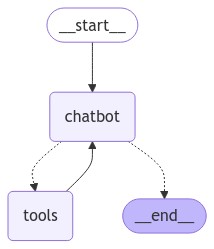
다음으로 생성된 노드들 chat, tools 노드를 edge로 연결해야 한다.
- 먼저 START --> chatbot 과 연결하고
- 다음은 tools --> chatbot하고 연결한다.
- 다음으로 coditional edge로, chatbot --> tools또는 END로 연결하는데, 이때 판단을 내리는 함수가 route_tools이다.
이때 State에 있는 메시지 중에서 사람이 입력한 메시지가 아니라, AIMessage를 읽어서, AI가 tool을 호출하려고 했는지를 "hasattr(ai_message,"tool_calls")"를 통해서 툴 호출을 시도했는지 확인하고, 툴 호출을 시도했을 경우 tools node로 라우팅한다. 해당 코드는 이해를 돕기 위한 코드이고 실제로는 langgraph에서 미리 만들어놓은 tools_condition , from langgraph.prebuilt import ToolNode, tools_condition을 사용한다.
완성된 그래프 구조는 다음과 같다.
아래는 전체 코드이다.
tool = TavilySearch(max_results=2)
tools = [tool]

llm = init_chat_model("google_genai:gemini-2.5-flash")
llm_with_tools = llm.bind_tools(tools)

class State(TypedDict):
    messages: Annotated[list, add_messages]

graph_builder = StateGraph(State)


def chatbot(state: State):
    return {"messages": [llm_with_tools.invoke(state["messages"])]}

graph_builder.add_node("chatbot", chatbot)

tool_node = ToolNode(tools=[tool])
graph_builder.add_node("tools", tool_node)

## Edge 연결
# Any time a tool is called, we return to the chatbot to decide the next step
graph_builder.add_edge("tools", "chatbot")
graph_builder.add_edge(START, "chatbot")

def route_tools(state: State):
    """
    Use in the conditional_edge to route to the ToolNode if the last message
    has tool calls. Otherwise, route to the end.
    """
    if isinstance(state, list):
        ai_message = state[-1]
    elif messages := state.get("messages", []):
        ai_message = messages[-1]
    else:
        raise ValueError(f"No messages found in input state to tool_edge: {state}")
    print(ai_message)
    if hasattr(ai_message, "tool_calls") and len(ai_message.tool_calls) > 0:
        return "tools"
    return END

graph_builder.add_conditional_edges(
    "chatbot",
    route_tools,
    #tools_condition,
    {"tools": "tools", END: END},
)

graph = graph_builder.compile()

def stream_graph_updates(user_input: str):
    for event in graph.stream({"messages": [{"role": "user", "content": user_input}]}):
        for value in event.values():
            print("Assistant:", value["messages"][-1].content)


while True:
    try:
        user_input = input("User: ")
        if user_input.lower() in ["quit", "exit", "q"]:
            print("Goodbye!")
            break
        stream_graph_updates(user_input)
    except Exception as e:
        # fallback if input() is not available
        print(f"Exception occurred: {e}")
        user_input = "What do you know about LangGraph?"
        print("User: " + user_input)
        stream_graph_updates(user_input)
        break